【Linux C】文件系统
作者:wallace-lai
发布:2024-05-29
更新:2024-07-30
文件系统对应APUE上的章节为:
第4章:文件和目录
第6章:系统数据文件和信息
第7章:进程环境
对应的教程:P142 ~ P166
P142 文件系统 - 介绍
1. 目录和文件
(1)获取文件属性
stat
fstat
lstat
(2)文件访问权限
st_mode是一个16位的位图,用于表示文件类型、访问权限、特殊权限位
(3)umask
(4)文件权限的更改、管理
(5)粘住位
(6)文件系统:FAT和UFS
(7)硬链接、符号链接
(8)utime
(9)目录的创建和销毁
(10)更改当前工作目录
2. 系统数据文件和信息
3. 进程环境
P143 ~ P145 文件系统 - stat
1. 接口
    #include <sys/types.h>
    #include <sys/stat.h>
    #include <unistd.h>

    int stat(const char *pathname, struct stat *statbuf);
    int fstat(int fd, struct stat *statbuf);
    int lstat(const char *pathname, struct stat *statbuf);

    struct stat {
        dev_t     st_dev;         /* ID of device containing file */
        ino_t     st_ino;         /* Inode number */
        mode_t    st_mode;        /* File type and mode */
        nlink_t   st_nlink;       /* Number of hard links */
        uid_t     st_uid;         /* User ID of owner */
        gid_t     st_gid;         /* Group ID of owner */
        dev_t     st_rdev;        /* Device ID (if special file) */
        off_t     st_size;        /* Total size, in bytes */
        blksize_t st_blksize;     /* Block size for filesystem I/O */
        blkcnt_t  st_blocks;      /* Number of 512B blocks allocated */

        /* Since Linux 2.6, the kernel supports nanosecond
            precision for the following timestamp fields.
            For the details before Linux 2.6, see NOTES. */

        struct timespec st_atim;  /* Time of last access */
        struct timespec st_mtim;  /* Time of last modification */
        struct timespec st_ctim;  /* Time of last status change */

    #define st_atime st_atim.tv_sec      /* Backward compatibility */
    #define st_mtime st_mtim.tv_sec
    #define st_ctime st_ctim.tv_sec
    };
2. stat应用案例
使用stat输出文件大小
static off_t flen(const char *pathname)
{
    struct stat res;
    if (stat(pathname, &res) < 0) {
        perror("stat()");
        exit(1);
    }

    return res.st_size;
}
3. 空洞文件
    off_t     st_size;        /* Total size, in bytes */
    blksize_t st_blksize;     /* Block size for filesystem I/O */
    blkcnt_t  st_blocks;      /* Number of 512B blocks allocated */
(1)st_size为文件逻辑上的大小
(2)st_blksize为文件系统的块大小
(3)st_blocks为所申请的512B大小的块个数
$ stat flen.c
  File: flen.c
  Size: 560             Blocks: 8          IO Block: 4096   regular file
解释:文件flen.c大小为560字节,文件系统块大小为4K,文件flen.c占用了8块512B的块(扇区)
创建一个包含大量空洞的5G大小文件:
    int fd = open(argv[1], O_WRONLY | O_CREAT | O_TRUNC, 0600);
    if (fd < 0) {
        perror("open()");
        exit(1);
    }

    off_t len = 5LL * 1024 * 1024 * 1024 - 1;
    ret = lseek(fd, len, SEEK_SET);
    if (ret < 0) {
        perror("lseek()");
        exit(1);
    }

    write(fd, "\0", 1);
    close(fd);
解释:
(1)使用lseek将文件当前位置设置到5G - 1的位置
(2)然后写入一个尾零\0
$ stat /tmp/bigfile
  File: /tmp/bigfile
  Size: 5368709120      Blocks: 8          IO Block: 4096   regular file
Device: fd00h/64768d    Inode: 655390      Links: 1

$ stat /tmp/bigfile.bak
  File: /tmp/bigfile.bak
  Size: 5368709120      Blocks: 8          IO Block: 4096   regular file
Device: fd00h/64768d    Inode: 655391      Links: 1
可以看到这个5G大小的文件实际只占用了4K大小的磁盘空间
4. 文件类型
(1)测试文件类型
    S_ISREG(m)  is it a regular file?
    S_ISDIR(m)  directory?
    S_ISCHR(m)  character device?
    S_ISBLK(m)  block device?
    S_ISFIFO(m) FIFO (named pipe)?
    S_ISLNK(m)  symbolic link?  (Not in POSIX.1-1996.)
    S_ISSOCK(m) socket?  (Not in POSIX.1-1996.)
(2)文件类型应用案例
    if (stat(fname, &res) < 0) {
        perror("stat");
        exit(1);
    }

    int ret = 0;
    if (S_ISREG(res.st_mode)) {
        ret = '-';
    } else if (S_ISDIR(res.st_mode)) {
        ret = 'd';
    } else if (S_ISCHR(res.st_mode)) {
        ret = 'c';
    } else if (S_ISBLK(res.st_mode)) {
        ret = 'b';
    } else if (S_ISFIFO(res.st_mode)) {
        ret = 'p';
    } else if (S_ISSOCK(res.st_mode)) {
        ret = 's';
    } else if (S_ISLNK(res.st_mode)) {
        ret = 'l';
    } else {
        ret = '?';
    }

    return ret;
(3)st_mode位图定义
The following mask values are defined for the file mode component of the st_mode field:

    S_ISUID     04000   set-user-ID bit (see execve(2))
    S_ISGID     02000   set-group-ID bit (see below)
    S_ISVTX     01000   sticky bit (see below)

    S_IRWXU     00700   owner has read, write, and execute permission
    S_IRUSR     00400   owner has read permission
    S_IWUSR     00200   owner has write permission
    S_IXUSR     00100   owner has execute permission

    S_IRWXG     00070   group has read, write, and execute permission
    S_IRGRP     00040   group has read permission
    S_IWGRP     00020   group has write permission
    S_IXGRP     00010   group has execute permission

    S_IRWXO     00007   others (not in group) have read,  write,  and
                        execute permission
    S_IROTH     00004   others have read permission
    S_IWOTH     00002   others have write permission
    S_IXOTH     00001   others have execute permission
P145 ~ P146 文件系统 - 文件权限的更改
1. umask
创建文件时如果没有指定访问权限,则其默认值为0600 & ~umask。umask的作用是防止产生权限过大的文件
    #include <sys/types.h>
    #include <sys/stat.h>

    mode_t umask(mode_t mask);
2. 更改文件权限
    #include <sys/stat.h>

    int chmod(const char *pathname, mode_t mode);
    int fchmod(int fd, mode_t mode);
3. 粘住位
t位(粘住位)的原始设计是针对二进制可执行文件,设置t位后可保留其使用痕迹,下次再次装载运行该文件时可以更快速。
现在最常用的是给目录设置t位,比如/tmp目录就设置了t位
$ ls -l /
dr-xr-xr-x  13 root root          0 Jul 23 22:55 sys
drwxrwxrwt  15 root root      12288 Jul 23 23:26 tmp
drwxr-xr-x  14 root root       4096 Aug 31  2022 usr
drwxr-xr-x  15 root root       4096 Jun 14 16:11 var
4. FAT文件系统
略
P147 文件系统 - UFS文件系统
略
P148 文件系统 - 链接文件
1. 命令
(1)创建硬链接:ln /tmp/bigfile /tmp/bigfile_link
(2)创建符号链接:ls -s /tmp/bigfile /tmp/bigfile_s
注意:硬链接与目录项是同义词,但建立硬链接有限制,即不能跨分区建立也不能给目录建立。符号链接可以跨越分区,也可以给目录建立符号链接。
2. 接口
    #include <unistd.h>

    int link(const char *oldpath, const char *newpath);
(1)使用link创建硬链接
    #include <unistd.h>

    int unlink(const char *pathname);
(2)使用unlink删除文件,不能删除非空目录
    #include <stdio.h>

    int remove(const char *pathname);
(3)使用remove删除文件或者目录,不能删除非空目录
    #include <stdio.h>

    int rename(const char *old, const char *new);
    int renameat(int oldfd, const char *old, int newfd,
        const char *new);
3. 更改时间
    #include <sys/types.h>
    #include <utime.h>

    int utime(const char *filename, const struct utimbuf *times);
utime用于改变文件的时间,可以更改atime和mtime
4. 创建和删除目录
    #include <sys/stat.h>
    #include <sys/types.h>

    int mkdir(const char *pathname, mode_t mode);

    #include <unistd.h>
    int rmdir(const char *pathname);
5. 更改当前工作目录
    #include <unistd.h>

    int chdir(const char *path);
    int fchdir(int fd);
    #include <unistd.h>

    char *getcwd(char *buf, size_t size);
获取当前的工作路径
P149 ~ P152 文件系统 - 目录解析
目录遍历有2中方式:
(1)使用glob
glob()
globfree()
(2)使用一些列的接口
opendir()
closedir()
readdir()
rewinddir()
seekdir()
telldir()
1. glob
    #include <glob.h>

    typedef struct {
        size_t   gl_pathc;    /* Count of paths matched so far  */
        char   **gl_pathv;    /* List of matched pathnames.  */
        size_t   gl_offs;     /* Slots to reserve in gl_pathv.  */
    } glob_t;

    int glob(const char *pattern, int flags,
            int (*errfunc) (const char *epath, int eerrno),
            glob_t *pglob);
    void globfree(glob_t *pglob);
2. glob应用案例
使用glob去匹配模式
    #define PAT "/etc/*"

    glob_t res = { 0 };

    err = glob(PAT, 0, NULL, &res);
    if (err) {
        printf("ERROR CODE : %d\n", err);
        exit(1);
    }

    for (int i = 0; i < res.gl_pathc; i++) {
        puts(res.gl_pathv[i]);
    }
解释:
(1)模式为"/etc/*"表示要找到/etc目录下的所有文件
3. 解析目录系列接口
(1)打开目录,和打开文件极其类似
    #include <sys/types.h>
    #include <dirent.h>

    DIR *opendir(const char *name);
    DIR *fdopendir(int fd);
(2)关闭目录
    #include <sys/types.h>
    #include <dirent.h>

    int closedir(DIR *dirp);
(3)读取目录内容
    #include <dirent.h>

    struct dirent {
        ino_t          d_ino;       /* Inode number */
        off_t          d_off;       /* Not an offset; see below */
        unsigned short d_reclen;    /* Length of this record */
        unsigned char  d_type;      /* Type of file; not supported
                                        by all filesystem types */
        char           d_name[256]; /* Null-terminated filename */
    };

    struct dirent *readdir(DIR *dirp);
(4)设置readdir()的读取位置,与操作文件位置接口极其类似
    #include <dirent.h>

    void seekdir(DIR *dirp, long loc);
    void rewinddir(DIR *dirp);
    long telldir(DIR *dirp);
4. readdir应用案例1
使用readdir解析目录下文件(不递归)
    #define PAT "/etc"

    dp = opendir(PAT);
    if (dp == NULL) {
        perror("opendir()");
        exit(1);
    }

    while ((curr = readdir(dp)) != NULL) {
        puts(curr->d_name);
    }
解释:
(1)先使用opendir打开目录,得到DIR指针
(2)使用readdir读取/etc目录下的所有文件名
5. readdir应用案例2
使用递归形式遍历目录,实现mydu程序。
【pending,有BUG】
    ret = lstat(path, &statres);
    if (ret < 0) {
        perror("lstat()");
        return 0;
    }

    if (!S_ISDIR(statres.st_mode)) {
        return (statres.st_blocks);
    }

    strncpy(nextpath, path, PATHSIZE);
    strncat(nextpath, "/*", strlen(nextpath) + strlen("/*") + 1);
    ret = glob(nextpath, 0, NULL, &globres);
    if (ret != 0) {
        perror("glob()");
        return 0;
    }

    strncpy(nextpath, path, PATHSIZE);
    strncat(nextpath, "/.*", strlen(nextpath) + strlen("/.*") + 1);
    ret = glob(nextpath, GLOB_APPEND, NULL, &globres);

    uint64_t sum = statres.st_blocks;
    for (int i = 0; i < globres.gl_pathc; i++) {
        if (is_current_or_parent_dir(globres.gl_pathv[i])) {
            continue;
        }
        sum += mydu(globres.gl_pathv[i]);
    }

    globfree(&globres);
解释:
(1)先判断是否为目录,不是目录则返回文件大小st_blocks即可,实际是文件所占的块个数,除以2才是以K为单位的大小值
(2)如果是目录,则使用glob解析到目录下的所有子文件和子目录,再次使用glob解析到所有的隐藏文件
(3)递归调用mydu
(4)程序有BUG,pending
P153 文件系统 - 系统文件和信息
1. 主要内容
(1)/etc/passwd
(2)/etc/group
(3)/etc/shadow
(4)时间戳
2. passwd文件
    #include <sys/types.h>
    #include <pwd.h>

    struct passwd {
        char   *pw_name;       /* username */
        char   *pw_passwd;     /* user password */
        uid_t   pw_uid;        /* user ID */
        gid_t   pw_gid;        /* group ID */
        char   *pw_gecos;      /* user information */
        char   *pw_dir;        /* home directory */
        char   *pw_shell;      /* shell program */
    };

    struct passwd *getpwnam(const char *name);

    struct passwd *getpwuid(uid_t uid);

    int getpwnam_r(const char *name, struct passwd *pwd,
                    char *buf, size_t buflen, struct passwd **result);

    int getpwuid_r(uid_t uid, struct passwd *pwd,
                    char *buf, size_t buflen, struct passwd **result);
使用getpwuid得到用户名:
    struct passwd *pwdline = NULL;
    pwdline = getpwuid(atoi(argv[1]));
    puts(pwdline->pw_name);
3. group文件
    #include <sys/types.h>
    #include <grp.h>

    struct group {
        char   *gr_name;        /* group name */
        char   *gr_passwd;      /* group password */
        gid_t   gr_gid;         /* group ID */
        char  **gr_mem;         /* NULL-terminated array of pointers
                                    to names of group members */
    };

    struct group *getgrnam(const char *name);

    struct group *getgrgid(gid_t gid);

    int getgrnam_r(const char *name, struct group *grp,
                char *buf, size_t buflen, struct group **result);

    int getgrgid_r(gid_t gid, struct group *grp,
                char *buf, size_t buflen, struct group **result);
P155 文件系统 - shadow文件
    struct spwd {
        char *sp_namp;     /* Login name */
        char *sp_pwdp;     /* Encrypted password */
        long  sp_lstchg;   /* Date of last change
                                (measured in days since
                                1970-01-01 00:00:00 +0000 (UTC)) */
        long  sp_min;      /* Min # of days between changes */
        long  sp_max;      /* Max # of days between changes */
        long  sp_warn;     /* # of days before password expires
                                to warn user to change it */
        long  sp_inact;    /* # of days after password expires
                                until account is disabled */
        long  sp_expire;   /* Date when account expires
                                (measured in days since
                                1970-01-01 00:00:00 +0000 (UTC)) */
        unsigned long sp_flag;  /* Reserved */
    };

    /* General shadow password file API */
    #include <shadow.h>

    struct spwd *getspnam(const char *name);
crypt()
    #include <unistd.h>

    char *getpass(const char *prompt);
1. 应用案例
int main(int argc, char *argv[])
{
    char *input = NULL;
    struct spwd *shadowline = NULL;
    char *crypted_pass = NULL;

    if (argc < 2) {
        fprintf(stderr, "Usage ...\n");
        exit(1);
    }

    input = getpass("Password :");
    shadowline = getspnam(argv[1]);
    crypted_pass = crypt(input, shadowline->sp_pwdp);
    if (strcmp(shadowline->sp_pwdp, crypted_pass) == 0) {
        puts("OK!");
    } else {
        puts("FAILED!");
    }

    exit(0);
}
程序链接不通过,原因是crypt函数的提供方式发生了变化
/usr/bin/ld: /tmp/ccHshNKB.o: in function `main':
chkpass.c:(.text+0x95): undefined reference to `crypt'
collect2: error: ld returned 1 exit status
make: *** [<builtin>: chkpass] Error 1
P156 ~ P158 文件系统 - 时间戳
1. 各种时间之间的转换
系统中,各种时间之间的转换关系如下图所示:
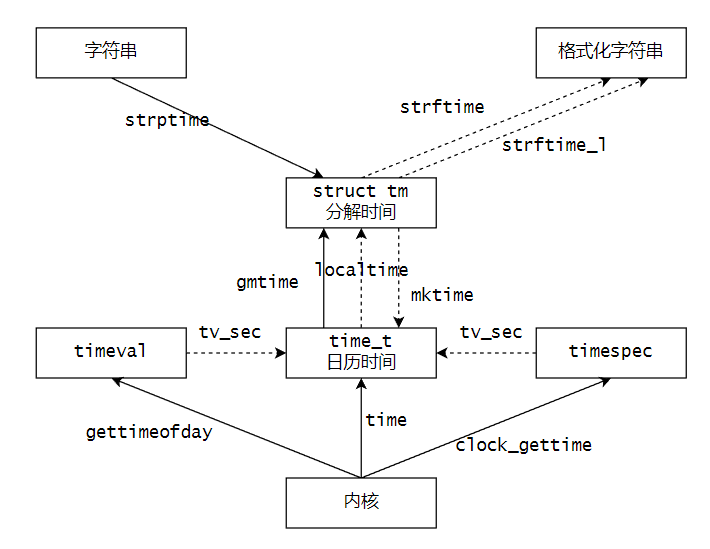
时间的表示类型:
(1)大整数:time_t
(2)字符串:char *
(3)结构体:struct tm
对应的切换函数:
(1)获取自1970年1月1日零时开始所经历的秒数:time()
    #include <time.h>

    time_t time(time_t *tloc);
(2)将time_t类型转换成struct tm类型:gmtime()
    #include <time.h>

    struct tm {
        int tm_sec;    /* Seconds (0-60) */
        int tm_min;    /* Minutes (0-59) */
        int tm_hour;   /* Hours (0-23) */
        int tm_mday;   /* Day of the month (1-31) */
        int tm_mon;    /* Month (0-11) */
        int tm_year;   /* Year - 1900 */
        int tm_wday;   /* Day of the week (0-6, Sunday = 0) */
        int tm_yday;   /* Day in the year (0-365, 1 Jan = 0) */
        int tm_isdst;  /* Daylight saving time */
    };

    struct tm *gmtime(const time_t *timep);
    struct tm *gmtime_r(const time_t *timep, struct tm *result);
(3)将time_t类型转换成struct tm类型:localtime()
    #include <time.h>
    struct tm *localtime(const time_t *timep);
    struct tm *localtime_r(const time_t *timep, struct tm *result);
(4)将struct tm类型转换成time_t:mktime()
    #include <time.h>
    time_t mktime(struct tm *tm);
(5)将struct tm格式化成字符串
    #include <time.h>

    size_t strftime(char *s, size_t max, const char *format,
                    const struct tm *tm);
2. 时间戳综合应用案例
要求往屏幕和文件中输出下面类似的时间戳,一秒一行:
0 2024-07-28 02:14:52
1 2024-07-28 02:14:53
2 2024-07-28 02:14:54
3 2024-07-28 02:14:55
    while (1) {
        stamp = time(NULL);
        localtime_r(&stamp, &result);
        memset(buffer, 0, BUFSIZE);
        (void)strftime(buffer, BUFSIZE, "%Y-%m-%d %H:%M:%S", &result);
        fprintf(stdout, "%u %s\n", count, buffer);
        fprintf(fp, "%u %s\n", count, buffer);
        fflush(NULL);

        count++;
        sleep(1);
    }
解释:
(1)使用time()从内核中获取当前所经历的秒数
(2)使用localtime_r将time_t转换成struct tm
(3)使用strftime将struct tm格式化成字符串
3. 时间戳中和应用案例
要求打印今天的年月日,然后再打印100天以后的年月日
    stamp = time(NULL);
    tm = localtime(&stamp);
    strftime(timestr, TIMESIZE, "Now : %Y-%m-%d", tm);
    puts(timestr);

    tm->tm_mday += 100;
    mktime(tm);
    strftime(timestr, TIMESIZE, "100 Days After : %Y-%m-%d", tm);
    puts(timestr);
解释:
(1)直接将tm_mday字段加上100后,利用mktime()的副作用调整tm
(2)调整完毕后,直接输出tm即可
P159 ~ P166 文件系统 - 进程环境
1. 相关话题:
(1)main函数
int main(int argc, char **argv, /* 古早的C语言:环境变量作为第三个参数 */);
(2)进程的终止
正常终止的情况:
从main函数返回
调用exit
调用_exit或者_Exit
最后一个线程从其启动例程中返回
最后一个线程调用pthread_exit
异常终止的情况:
调用abort
接到一个信号并终止
最后一个线程对其取消请求作出响应
(3)命令行参数分析
(4)环境变量
(5)C程序的存储空间布局
(6)库
(7)函数跳转
(8)资源的获取其控制
2. 钩子函数
    #include <stdlib.h>

    void exit(int status);
All functions registered with atexit(3) and on_exit(3) are called, in the reverse order of their registration. 当调用exit时,所有由atexit或者on_exit注册的钩子函数将会以注册顺序逆序的方式调用。
    puts("BEGIN ...");
    atexit(f1);
    atexit(f2);
    atexit(f3);
    puts("END ...");
运行得到结果:
$ ./atexit
BEGIN ...
END ...
f3 working !
f2 working !
f1 working !
    #include <stdlib.h>

    int atexit(void (*function)(void));
exit、_exit和_Exit之间的区别如下图所示:
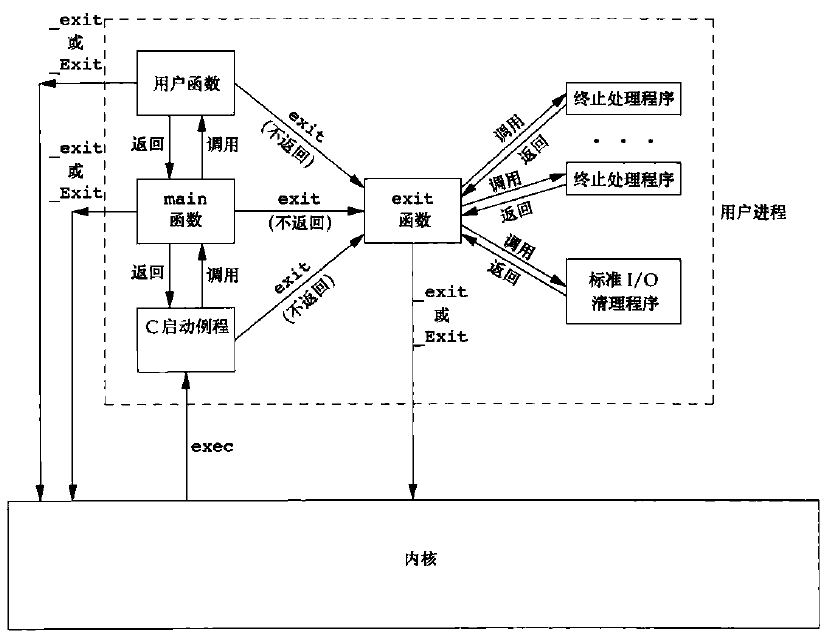
总结而言就是,_exit和_Exit是系统调用,调用它们会立即退出程序,而调用exit则是会首先进行各种清理,完成后再退出程序。
什么时候使用_exit或者_Exit立即退出程序?主要是遇到踩内存这种严重错误的时候。
3. 命令行参数分析
    #include <unistd.h>

    int getopt(int argc, char * const argv[],
                const char *optstring);
    int getopt_long(int argc, char * const argv[],
                const char *optstring,
                const struct option *longopts, int *longindex);
将上节的100days程序改造成支持命令行输入的形式
【pending】
4. 环境变量
使用export查看环境变量:
$ export
declare -x DBUS_SESSION_BUS_ADDRESS="unix:path=/run/user/1000/bus"
declare -x HOME="/home/xxx"
declare -x LANG="en_US.UTF-8"
declare -x LESSCLOSE="/usr/bin/lesspipe %s %s"
declare -x LESSOPEN="| /usr/bin/lesspipe %s"
declare -x LOGNAME="xxx"
declare -x MOTD_SHOWN="pam"
declare -x OLDPWD
declare -x PATH="/usr/local/sbin:/usr/local/bin:/usr/sbin:/usr/bin:/sbin:/bin:/usr/games:/usr/local/games:/snap/bin:/usr/local/go/bin"
declare -x PWD="/home/xxx"
declare -x SHELL="/bin/bash"
declare -x SHLVL="1"
declare -x SSH_CLIENT="192.168.40.1 6331 22"
declare -x SSH_CONNECTION="192.168.40.1 6331 192.168.40.135 22"
declare -x SSH_TTY="/dev/pts/0"
declare -x TERM="xterm-256color"
declare -x USER="xxx"
declare -x XDG_DATA_DIRS="/usr/local/share:/usr/share:/var/lib/snapd/desktop"
declare -x XDG_RUNTIME_DIR="/run/user/1000"
declare -x XDG_SESSION_CLASS="user"
declare -x XDG_SESSION_ID="1"
declare -x XDG_SESSION_TYPE="tty"
(1)HOME表示当前用户的家目录
(2)PATH表示二进制命令所在路径,这些二进制命令被称为外部命令
(3)PWD表示当前工作所在的路径
(4)环境变量是程序员或者系统管理员跟操作系统之间的约定
环境变量相关接口:
    extern char **environ;

    #include <stdlib.h>

    char *getenv(const char *name);

    int setenv(const char *name, const char *value, int overwrite);
    int unsetenv(const char *name);
environ是一个char *数组,数组中的所有指针指向了一个环境变量的起始地址。
打印所有环境变量:
extern char **environ;

int main()
{
    for (int i = 0; environ[i] != NULL; i++) {
        puts(environ[i]);
    }

    exit(0);
}
查看运行结果:
$ ./myenv
SHELL=/bin/bash
PWD=/home/xxx/dev/learn-apue/src/fs
LOGNAME=xxx
XDG_SESSION_TYPE=tty
MOTD_SHOWN=pam
HOME=/home/xxx
LANG=en_US.UTF-8
SSH_CONNECTION=192.168.40.1 6331 192.168.40.135 22
LESSCLOSE=/usr/bin/lesspipe %s %s
XDG_SESSION_CLASS=user
TERM=xterm-256color
LESSOPEN=| /usr/bin/lesspipe %s
USER=xxx
SHLVL=1
XDG_SESSION_ID=1
XDG_RUNTIME_DIR=/run/user/1000
SSH_CLIENT=192.168.40.1 6331 22
XDG_DATA_DIRS=/usr/local/share:/usr/share:/var/lib/snapd/desktop
PATH=/usr/local/sbin:/usr/local/bin:/usr/sbin:/usr/bin:/sbin:/bin:/usr/games:/usr/local/games:/snap/bin:/usr/local/go/bin
DBUS_SESSION_BUS_ADDRESS=unix:path=/run/user/1000/bus
SSH_TTY=/dev/pts/0
OLDPWD=/home/xxx
_=./myenv
get和set环境变量
    puts(getenv("HOME"));
    setenv("PNAME", "getenv.c", 1);
    puts(getenv("PNAME"));
查看运行结果:
$ ./getenv
/home/xxx
getenv.c
setenv的原理:释放原先旧的环境变量,然后在堆上申请空间存放新的环境变量
5. C程序空间分布
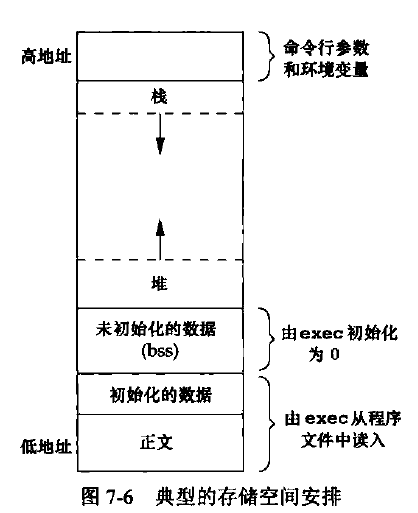
注意:以32位X86机器上的Linux为例,上图只画了低地址0 ~ 3G的情况,即用户空间。而最高地址的1G属于内核空间。
利用pmap命令查看getenv程序的空间分布情况:
$ pmap 5628
5628:   ./getenv
00005652530b1000      4K r---- getenv
00005652530b2000      4K r-x-- getenv
00005652530b3000      4K r---- getenv
00005652530b4000      4K r---- getenv
00005652530b5000      4K rw--- getenv
000056525382c000    132K rw---   [ anon ]
00007f8cfb684000    136K r---- libc-2.31.so
00007f8cfb6a6000   1504K r-x-- libc-2.31.so
00007f8cfb81e000    312K r---- libc-2.31.so
00007f8cfb86c000     16K r---- libc-2.31.so
00007f8cfb870000      8K rw--- libc-2.31.so
00007f8cfb872000     24K rw---   [ anon ]
00007f8cfb887000      4K r---- ld-2.31.so
00007f8cfb888000    140K r-x-- ld-2.31.so
00007f8cfb8ab000     32K r---- ld-2.31.so
00007f8cfb8b4000      4K r---- ld-2.31.so
00007f8cfb8b5000      4K rw--- ld-2.31.so
00007f8cfb8b6000      4K rw---   [ anon ]
00007ffd09037000    132K rw---   [ stack ]
00007ffd090d5000     12K r----   [ anon ]
00007ffd090d8000      4K r-x--   [ anon ]
ffffffffff600000      4K --x--   [ anon ]
 total             2492K
写程序验证C语言各种变量所在的空间分布。【pending】
6. 库
库有以下几种:
(1)动态库
(2)静态库
(3)手工装载库
手工装载库相关接口
       #include <dlfcn.h>

       void *dlopen(const char *filename, int flags);

       int dlclose(void *handle);

       void *dlsym(void *handle, const char *symbol);
#include <stdio.h>
#include <stdlib.h>
#include <dlfcn.h>
#include <gnu/lib-names.h>  /* Defines LIBM_SO (which will be a
                                string such as "libm.so.6") */
int main(void)
{
    void *handle;
    double (*cosine)(double);
    char *error;

    handle = dlopen(LIBM_SO, RTLD_LAZY);
    if (!handle) {
        fprintf(stderr, "%s\n", dlerror());
        exit(EXIT_FAILURE);
    }

    dlerror();    /* Clear any existing error */

    cosine = (double (*)(double)) dlsym(handle, "cos");

    /* According to the ISO C standard, casting between function
        pointers and 'void *', as done above, produces undefined results.
        POSIX.1-2003 and POSIX.1-2008 accepted this state of affairs and
        proposed the following workaround:
            *(void **) (&cosine) = dlsym(handle, "cos");

        This (clumsy) cast conforms with the ISO C standard and will
        avoid any compiler warnings.

        The 2013 Technical Corrigendum to POSIX.1-2008 (a.k.a.
        POSIX.1-2013) improved matters by requiring that conforming
        implementations support casting 'void *' to a function pointer.
        Nevertheless, some compilers (e.g., gcc with the '-pedantic'
        option) may complain about the cast used in this program. */

    error = dlerror();
    if (error != NULL) {
        fprintf(stderr, "%s\n", error);
        exit(EXIT_FAILURE);
    }

    printf("%f\n", (*cosine)(2.0));
    dlclose(handle);
    exit(EXIT_SUCCESS);
}
解释:
(1)使用dlopen延迟加载libm.so.6这个动态库
(2)使用dlsym查找动态库中的cos函数
(3)计算cos(2.0)的值并打印
7. 函数跳转
C语言中的goto语句无法实现跨函数跳转,但如果一定要跨函数跳转呢?比如在深度1万的树中递归查找某个值,如何快速返回?
跨函数跳转接口
    #include <setjmp.h>

    int setjmp(jmp_buf env);
    int sigsetjmp(sigjmp_buf env, int savesigs);

    void longjmp(jmp_buf env, int val);
    void siglongjmp(sigjmp_buf env, int val);
解释:
(1)setjmp用于设置跳转点
(2)longjmp用于跳转到指定的跳转点
函数跳转应用案例
static jmp_buf save;

static void d(void)
{
    printf("%s() : BEGIN ...\n", __FUNCTION__);

    printf("%s() : JUMP NOW ...\n", __FUNCTION__);
    longjmp(save, 0);

    printf("%s() : END ...\n", __FUNCTION__);
}

static void c(void)
{
    printf("%s() : BEGIN ...\n", __FUNCTION__);
    printf("%s() : CALL d() ...\n", __FUNCTION__);
    d();
    printf("%s() : d() RETURNED ...\n", __FUNCTION__);
    printf("%s() : END ...\n", __FUNCTION__);
}

static void b(void)
{
    printf("%s() : BEGIN ...\n", __FUNCTION__);
    printf("%s() : CALL c() ...\n", __FUNCTION__);
    c();
    printf("%s() : c() RETURNED ...\n", __FUNCTION__);
    printf("%s() : END ...\n", __FUNCTION__);
}

static void a(void)
{
    int ret;
    printf("%s() : BEGIN ...\n", __FUNCTION__);

    ret = setjmp(save);
    if (ret == 0) {
        printf("%s() : CALL b() ...\n", __FUNCTION__);
        b();
        printf("%s() : b() RETURNED ...\n", __FUNCTION__);
    } else {
        printf("%s() : JUMPED BACK HERE WITH CODE %d\n", __FUNCTION__, ret);
    }

    printf("%s() : END ...\n", __FUNCTION__);
}

int main()
{
    printf("%s() : BEGIN ...\n", __FUNCTION__);
    printf("%s() : CALL a() ...\n", __FUNCTION__);
    a();
    printf("%s() : a() RETURNED ...\n", __FUNCTION__);
    printf("%s() : END ...\n", __FUNCTION__);
}
解释:
(1)函数调用流程为:main --> a --> b --> c --> d --> return a;
(2)在a函数中,如果setjmp返回值为0表示正常调用流程,如果非0则表示是从别的地方longjmp跳转过来的;
(3)在d函数中,使用longjmp跳转到a函数中的setjmp处。如果故意设置返回值为0,则跳转后的真实返回值会用1代替;
8. 资源的获取与控制
相关接口
    #include <sys/time.h>
    #include <sys/resource.h>

    struct rlimit {
        rlim_t rlim_cur;  /* Soft limit */
        rlim_t rlim_max;  /* Hard limit (ceiling for rlim_cur) */
    };

    int getrlimit(int resource, struct rlimit *rlim);
    int setrlimit(int resource, const struct rlimit *rlim);
(1)无论是root用户还是普通用户,软限制rlim_cur都不能超过硬限制rlim_max;
(2)普通用户对于自己的硬限制只能降低,不能抬高。对于软限制可以降低也可以抬高,但是不能超过硬限制;
(3)root用户对于自己的硬限制可以降低,也可以抬高。对于软限制也可以降低也可以抬高,但是不能超过硬限制;
(4)常见的resource:
RLIMIT_CORE:core文件大小限制
RLIMIT_FSIZE:所能创建的文件最大数值
RLIMIT_STACK:栈空间大小
综合应用案例
myls程序的实现。
【pending】